2. prtecan Tutorial#
This tutorial demonstrates how to process Tecan plate reader data using the clophfit.prtecan module.
What you’ll learn:
Tecan file structure and label blocks
Building titrations from multiple files (manually and from list file)
Setting plate scheme, loading additions, background handling
Inspecting and plotting results
Brief overview of fitting methods and quality control
# Setup
%load_ext autoreload
%autoreload 2

from pathlib import Path

import arviz as az
import matplotlib.pyplot as plt
import numpy as np

%matplotlib inline

from clophfit import prtecan

# Point to the tests data directory shipped with the repo
data_root = Path("../../tests/Tecan")
l1_dir = data_root / "L1"
l2_dir = data_root / "140220"  # second dataset used by the original tutorial
l4_dir = data_root / "L4"
2.1. Understanding Tecan file structure#
Each Tecan file contains global metadata and one or more label blocks (measurement blocks). Blocks with identical key metadata are equivalent; blocks differing only by Integration Time, Flashes, or Gain are almost equivalent after normalization.
# Load a single Tecan file and inspect label blocks
tf = prtecan.Tecanfile(l1_dir / "290513_7.2.xls")
lb1, lb2 = tf.labelblocks["1"], tf.labelblocks["2"]
print("Available label blocks:", list(tf.labelblocks.keys()))
lb1.metadata
Available label blocks: ['1', '2']
{'Label': Metadata(value='Label1', unit=None),
 'Mode': Metadata(value='Fluorescence Top Reading', unit=None),
 'Excitation Wavelength': Metadata(value=400, unit=['nm']),
 'Emission Wavelength': Metadata(value=535, unit=['nm']),
 'Excitation Bandwidth': Metadata(value=20, unit=['nm']),
 'Emission Bandwidth': Metadata(value=25, unit=['nm']),
 'Gain': Metadata(value=94, unit=['Manual']),
 'Number of Flashes': Metadata(value=10, unit=None),
 'Integration Time': Metadata(value=20, unit=['µs']),
 'Lag Time': Metadata(value='µs', unit=None),
 'Settle Time': Metadata(value='ms', unit=None),
 'Start Time:': Metadata(value='29/05/2013 12.28.10', unit=None),
 'Temperature': Metadata(value=24.9, unit=['°C']),
 'End Time:': Metadata(value='29/05/2013 12.28.50', unit=None)}
print("\nSample Data (A01-B06):")
print({k: v for i, (k, v) in enumerate(lb2.data.items()) if i < 18})
Sample Data (A01-B06):
{'A01': 8761.0, 'A02': 15316.0, 'A03': 14346.0, 'A04': 8474.0, 'A05': 16319.0, 'A06': 10912.0, 'A07': 10855.0, 'A08': 12565.0, 'A09': 16695.0, 'A10': 12125.0, 'A11': 10895.0, 'A12': 36597.0, 'B01': 10280.0, 'B02': 11124.0, 'B03': 19612.0, 'B04': 10109.0, 'B05': 11239.0, 'B06': 8556.0}
Load additional files to compare block equivalence and demonstrate normalization across Gain differences.
tf1 = prtecan.Tecanfile(l1_dir / "290513_5.5.xls")  # two equivalent blocks
tf2 = prtecan.Tecanfile(
    l1_dir / "290513_8.8.xls"
)  # one equivalent, one almost equivalent

print("tf.lb1 = tf2.lb1 (strict):", lb1 == tf2.labelblocks["1"])
print("tf.lb2 = tf2.lb2 (strict):", lb2 == tf2.labelblocks["2"])
print("tf.lb2 ~ tf2.lb2 (almost):", lb2.almost_equal(tf2.labelblocks["2"]))
tf.lb1 = tf2.lb1 (strict): True
tf.lb2 = tf2.lb2 (strict): False
tf.lb2 ~ tf2.lb2 (almost): True
2.2. Grouping files: manual and convenience constructor#
You can group equivalent blocks across files either via TecanfilesGroup or by constructing a Titration directly.
# Manual grouping
tfg = prtecan.TecanfilesGroup([tf2, tf, tf1])
lbg1 = tfg.labelblocksgroups["1"]
print("Well A01 raw:", lbg1.data["A01"])
print("Well A01 normalized:", lbg1.data_nrm["A01"])

# Same using Titration with explicit x (e.g., pH values)
tit_manual = prtecan.Titration([tf2, tf, tf1], x=np.array([8.8, 7.2, 5.5]), is_ph=True)
print(tit_manual)
print(
    "A01 normalized via Titration:", tit_manual.labelblocksgroups["1"].data_nrm["A01"]
)
tit_manual.labelblocksgroups == tfg.labelblocksgroups
Well A01 raw: [17123.0, 17088.0, 18713.0]
Well A01 normalized: [910.7978723404256, 908.936170212766, 995.3723404255319]
Titration
	files=["../../tests/Tecan/L1/290513_8.8.xls", ...],
	x=[np.float64(8.8), np.float64(7.2), np.float64(5.5)],
	x_err=[],
	labels=dict_keys(['1', '2']),
	params=TitrationConfig(bg=True, bg_adj=False, dil=True, nrm=True, bg_mth='mean', fit_method='huber', outlier=None, mcmc='None', nuts_sampler='default', n_mcmc_samples=2000, ctr_free_k=False, noise_alpha=(), noise_gain=(), mask_outliers=False, outlier_threshold=0.2, discard_bad_wells=False)	pH=True	additions=[]
	scheme=PlateScheme(file=None, _buffer=[], _discard=[], _ctrl=[], _names={}))
A01 normalized via Titration: [910.7978723404256, 908.936170212766, 995.3723404255319]
True
2.3. Build a titration from a list file#
Using a list file is convenient and less error-prone. The example list/plate files are in tests/Tecan/L1.
tit = prtecan.Titration.fromlistfile(l1_dir / "list.pH.csv", is_ph=True)
print("x values (e.g., pH):", tit.x)
lbg1 = tit.labelblocksgroups["1"]
lbg2 = tit.labelblocksgroups["2"]
print(
    "Temperature in labelblocksgroup 2:",
    [lb.metadata.get("Temperature").value for lb in lbg2.labelblocks],
    lbg2.labelblocks[5].metadata.get("Temperature").unit[0],
)
(lbg1.metadata, lbg2.metadata)
x values (e.g., pH): [8.9  8.3  7.7  7.05 6.55 6.   5.5 ]
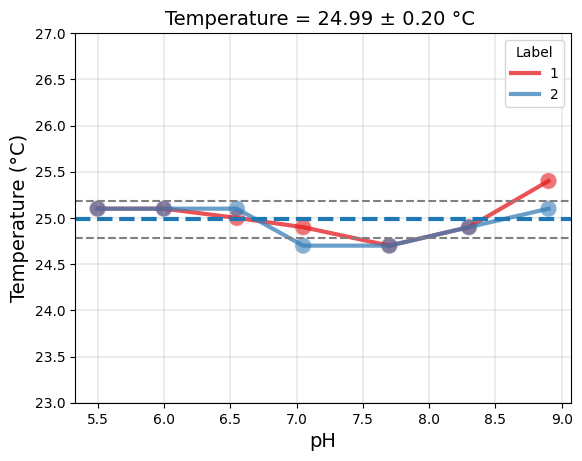
Temperature in labelblocksgroup 2: [25.1, 24.9, 24.7, 24.7, 25.1, 25.1, 25.1] °C
({'Label': Metadata(value='Label1', unit=None),
  'Mode': Metadata(value='Fluorescence Top Reading', unit=None),
  'Excitation Wavelength': Metadata(value=400, unit=['nm']),
  'Emission Wavelength': Metadata(value=535, unit=['nm']),
  'Excitation Bandwidth': Metadata(value=20, unit=['nm']),
  'Emission Bandwidth': Metadata(value=25, unit=['nm']),
  'Number of Flashes': Metadata(value=10, unit=None),
  'Integration Time': Metadata(value=20, unit=['µs']),
  'Lag Time': Metadata(value='µs', unit=None),
  'Settle Time': Metadata(value='ms', unit=None),
  'Gain': Metadata(value=94, unit=None)},
 {'Label': Metadata(value='Label2', unit=None),
  'Mode': Metadata(value='Fluorescence Top Reading', unit=None),
  'Excitation Wavelength': Metadata(value=485, unit=['nm']),
  'Emission Wavelength': Metadata(value=535, unit=['nm']),
  'Excitation Bandwidth': Metadata(value=25, unit=['nm']),
  'Emission Bandwidth': Metadata(value=25, unit=['nm']),
  'Number of Flashes': Metadata(value=10, unit=None),
  'Integration Time': Metadata(value=20, unit=['µs']),
  'Lag Time': Metadata(value='µs', unit=None),
  'Settle Time': Metadata(value='ms', unit=None),
  'Movement': Metadata(value='Move Plate Out', unit=None)})
Within each label-block group, normalized data (by Gain, Flashes, Integration Time) are readily available. In the case of not fully identical labelblock metadata non-normalized data might not exist (empty dict {}).
# Inspect raw vs normalized for a sample well
well = "H03"
(lbg1.data[well], lbg2.data, lbg1.data_nrm[well], lbg2.data_nrm[well])
([27593.0, 26956.0, 26408.0, 26815.0, 28308.0, 30227.0, 30640.0],
 {},
 [1467.712765957447,
  1433.8297872340427,
  1404.6808510638298,
  1426.3297872340427,
  1505.7446808510638,
  1607.8191489361702,
  1629.787234042553],
 [1456.2121212121212,
  1363.9285714285716,
  1310.357142857143,
  1214.5408163265306,
  1200.9693877551022,
  1224.642857142857,
  1193.8265306122448])
2.4. Load plate scheme and additions#
The plate scheme defines buffer and control wells; additions define dilution steps.
After loading these, the processed tit.data[...] arrays reflect background subtraction and optional dilution correction, depending on tit.params.
# Load plate scheme and additions (kept to L1 files for consistency)
tit.load_scheme(l1_dir / "scheme.txt")
print(
    f"Titration with {len(tit.tecanfiles)} files and {len(tit.labelblocksgroups)} label groups"
)
print("Buffer wells:", tit.scheme.buffer)
print("Control wells:", tit.scheme.ctrl)
print("Named groups:", tit.scheme.names)

tit.load_additions(l1_dir / "additions.pH")
print("Additions:", tit.additions)
tit.params.bg_adj = False
tit.params.bg_mth = "meansd"
print("Titration Params:", tit.params)
# Example: compare values in data vs normalized groups (after scheme/additions)
(lbg1.data["H12"], tit.data["1"]["H12"], lbg1.data_nrm["H12"], tit.bg["1"])
Titration with 7 files and 2 label groups
Buffer wells: ['C12', 'D01', 'D12', 'E01', 'E12', 'F01']
Control wells: ['B01', 'G01', 'A12', 'C01', 'B12', 'F12', 'H01']
Named groups: {'E2GFP': {'C01', 'F12', 'G01', 'B12'}, 'V224L': {'H01', 'A12'}, 'V224Q': {'B01'}}
Additions: [100, 2, 2, 2, 2, 2, 2]
Titration Params: TitrationConfig(bg=True, bg_adj=False, dil=True, nrm=True, bg_mth='meansd', fit_method='huber', outlier=None, mcmc='None', nuts_sampler='default', n_mcmc_samples=2000, ctr_free_k=False, noise_alpha=(), noise_gain=(), mask_outliers=False, outlier_threshold=0.2, discard_bad_wells=False)
([28309.0, 27837.0, 26511.0, 25771.0, 27048.0, 27794.0, 28596.0],
 array([302.45567376, 321.23670213, 313.92695035, 277.94929078,
        353.65212766, 335.1001773 , 316.34042553]),
 [1505.7978723404256,
  1480.6914893617022,
  1410.159574468085,
  1370.7978723404256,
  1438.723404255319,
  1478.404255319149,
  1521.063829787234],
 array([1203.34219858, 1165.7535461 , 1108.30673759, 1108.58156028,
        1111.2677305 , 1173.7677305 , 1238.61702128]))
Background handling summary:
labelblocksgroups[:].data: unchanged raw block data
labelblocksgroups[:].data_buffersubtracted: background-subtracted
tit.data: background-subtracted and dilution-corrected (if enabled)
The order in which you apply dilution correction and plate scheme can impact your intermediate results, even though the final results might be the same.
Dilution correction adjusts the measured data to account for any dilutions made during sample preparation. This typically involves multiplying the measured values by the dilution factor to estimate the true concentration of the sample.

A plate scheme describes the layout of the samples on a plate (common in laboratory experiments, such as those involving microtiter plates). The plate scheme may involve rearranging or grouping the data in some way based on the physical location of the samples on the plate.
# Demonstrate changing background wells and seeing bg estimate
import copy

tit2 = copy.deepcopy(tit)
tit2.params.bg = True
tit2.buffer.wells = ["D01", "E01"]
tit.bg, tit2.bg
({'1': array([1203.34219858, 1165.7535461 , 1108.30673759, 1108.58156028,
         1111.2677305 , 1173.7677305 , 1238.61702128]),
  '2': array([505.62289562, 467.14285714, 473.48639456, 500.29761905,
         524.3622449 , 584.3452381 , 581.8962585 ])},
 {'1': array([1016.62234043,  971.56914894,  937.9787234 ,  951.38297872,
          985.74468085, 1005.26595745, 1070.85106383]),
  '2': array([420.05050505, 364.69387755, 382.5255102 , 402.19387755,
         430.84183673, 455.07653061, 466.19897959])})
2.5. Quick look at fitting and results#
The tit.results container provides per-label fits; tit.result_global combines multiple labels.
Below we only preview access/plotting. For advanced Bayesian/ODR methods, see the dedicated section.
tit.bg_err
{'1': array([85.42617933, 85.42617933, 85.42617933, 85.42617933, 85.42617933,
        85.42617933, 85.42617933]),
 '2': array([54.27412064, 54.27412064, 54.27412064, 54.27412064, 54.27412064,
        54.27412064, 54.27412064])}
from clophfit.fitting.pipeline import fit_plate
from clophfit.prtecan import TitrationResults

# Create dataset dicts
ds_dict1 = tit.create_dataset_dict("1")
ds_dict2 = tit.create_dataset_dict("2")
ds_dict_glob = tit.create_dataset_dict()

# Compute fits
res1 = fit_plate(ds_dict1, method="lm")
res2 = fit_plate(ds_dict2, method="lm")
res_glob = fit_plate(ds_dict_glob, method="lm")
res_odr = fit_plate(ds_dict_glob, method="odr")

# Create TitrationResults wrappers for dataframe access
tr1 = TitrationResults(tit.scheme, tit.fit_keys, res1)
tr2 = TitrationResults(tit.scheme, tit.fit_keys, res2)
tr_glob = TitrationResults(tit.scheme, tit.fit_keys, res_glob)
tr_odr = TitrationResults(tit.scheme, tit.fit_keys, res_odr)

# Access result objects and figures
well = "D10"
single1 = tr1[well]
single2 = tr2[well]
glob = tr_glob[well]
odr = tr_odr[well]

# Display figures inline
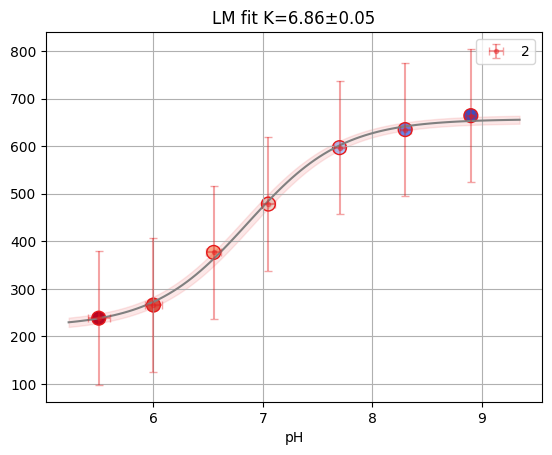
print(f"Reduced X2: {single2.result.redchi:.3f}")
single2.figure
lm
lm
lm
Reduced X2: 0.006
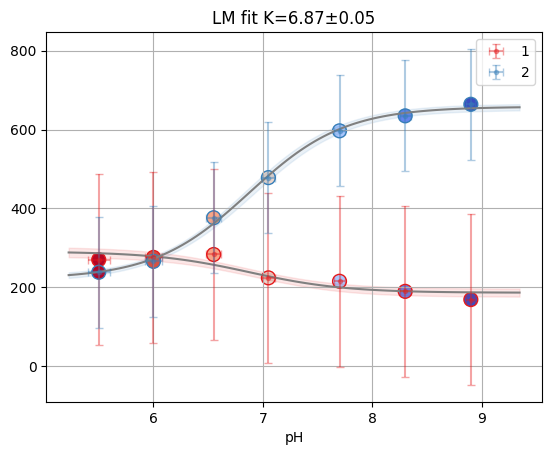
print(f"Reduced X2: {glob.result.redchi:.3f}")
glob.figure
Reduced X2: 0.006
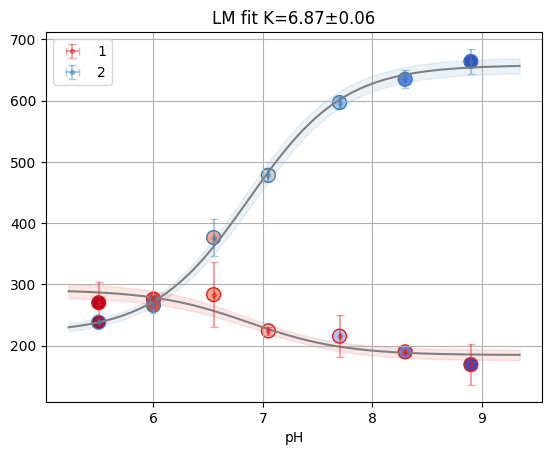
print(f"Reduced X2: {odr.mini.sum_square:.3f}")
odr.figure
Reduced X2: 0.000
tr1.dataframe.head()
| K | sK | Khdi03 | Khdi97 | S0_1 | sS0_1 | S0_1hdi03 | S0_1hdi97 | S1_1 | sS1_1 | S1_1hdi03 | S1_1hdi97 | |
|---|---|---|---|---|---|---|---|---|---|---|---|---|
| well | ||||||||||||
| A02 | 8.274542 | 0.245625 | 3 | 11 | -191.443632 | 23.499922 | -inf | inf | -61.883570 | 6.005122 | -inf | inf |
| A03 | 8.360129 | 0.591549 | 3 | 11 | -139.134032 | 36.276847 | -inf | inf | -61.218428 | 7.923119 | -inf | inf |
| A04 | 8.658066 | 0.801715 | 3 | 11 | -159.196728 | 80.445013 | -inf | inf | -59.099618 | 8.767691 | -inf | inf |
| A05 | 7.341777 | 0.170989 | 3 | 11 | 38.356159 | 11.168277 | -inf | inf | 192.793355 | 9.308983 | -inf | inf |
| A06 | 8.613653 | 1.275045 | 3 | 11 | -69.258838 | 62.822440 | -inf | inf | -18.203824 | 7.723070 | -inf | inf |
# Only fit D10 to avoid computing MCMC for the entire plate
ds_mcmc = {"D10": tit.create_global_ds("D10")}
res_mcmc = fit_plate(ds_mcmc, method="mcmc")
tr_mcmc = TitrationResults(tit.scheme, tit.fit_keys, res_mcmc)
tr_mcmc
Initializing NUTS using jitter+adapt_diag...
Sequential sampling (2 chains in 1 job)
NUTS: [K, S0_1, S1_1, S0_2, S1_2, x_diff, x_start, ye_mag_1, ye_mag_2]
Sampling 2 chains for 1_000 tune and 2_000 draw iterations (2_000 + 4_000 draws total) took 43 seconds.
There were 28 divergences after tuning. Increase `target_accept` or reparameterize.
We recommend running at least 4 chains for robust computation of convergence diagnostics
{'D10': FitResult(figure=<Figure size 640x480 with 1 Axes>, result=_Result(params=Parameters([('K', <Parameter 'K', value=6.931 +/- 0.152, bounds=[-inf:inf]>), ('S0_1', <Parameter 'S0_1', value=185.3 +/- 16, bounds=[-inf:inf]>), ('S1_1', <Parameter 'S1_1', value=290.8 +/- 18.5, bounds=[-inf:inf]>), ('S0_2', <Parameter 'S0_2', value=662.2 +/- 15, bounds=[-inf:inf]>), ('S1_2', <Parameter 'S1_2', value=221.0 +/- 19, bounds=[-inf:inf]>)]), residual=array([-0.08008923,  0.00122538,  0.0697292 , -0.02306595,  0.12563368,
       -0.01420229, -0.07695491,  0.0461354 , -0.06571755, -0.01564381,
       -0.00487597,  0.07599214, -0.02985872,  0.00247177]), redchi=0.0, success=True), mini=<xarray.DataTree>
Group: /
├── Group: /posterior
│       Dimensions:       (chain: 2, draw: 2000, x_diff_dim_0: 6, x_true_dim_0: 7)
│       Coordinates:
│         * chain         (chain) int64 16B 0 1
│         * draw          (draw) int64 16kB 0 1 2 3 4 5 ... 1995 1996 1997 1998 1999
│         * x_diff_dim_0  (x_diff_dim_0) int64 48B 0 1 2 3 4 5
│         * x_true_dim_0  (x_true_dim_0) int64 56B 0 1 2 3 4 5 6
│       Data variables:
│           K             (chain, draw) float64 32kB 7.169 7.282 7.299 ... 6.849 7.032
│           S0_1          (chain, draw) float64 32kB 180.2 176.3 190.8 ... 194.8 174.4
│           S1_1          (chain, draw) float64 32kB 298.4 288.0 291.1 ... 311.7 291.4
│           S0_2          (chain, draw) float64 32kB 663.8 672.1 654.5 ... 647.7 645.3
│           S1_2          (chain, draw) float64 32kB 222.7 239.3 195.4 ... 255.2 223.1
│           x_start       (chain, draw) float64 32kB 8.875 8.917 8.885 ... 8.926 8.955
│           x_diff        (chain, draw, x_diff_dim_0) float64 192kB 0.4703 ... 0.6232
│           ye_mag_1      (chain, draw) float64 32kB 0.08697 0.07868 ... 0.1968 0.07101
│           ye_mag_2      (chain, draw) float64 32kB 0.1164 0.2256 ... 0.3093 0.1807
│           x_true        (chain, draw, x_true_dim_0) float64 224kB 8.875 ... 5.476
│       Attributes:
│           created_at:                 2026-06-06T09:45:45.342489+00:00
│           creation_library:           ArviZ
│           creation_library_version:   1.1.0
│           creation_library_language:  Python
│           inference_library:          pymc
│           inference_library_version:  6.0.1
│           sample_dims:                ['chain', 'draw']
│           sampling_time:              43.4565749168396
│           tuning_steps:               1000
├── Group: /sample_stats
│       Dimensions:                (chain: 2, draw: 2000)
│       Coordinates:
│         * chain                  (chain) int64 16B 0 1
│         * draw                   (draw) int64 16kB 0 1 2 3 4 ... 1996 1997 1998 1999
│       Data variables: (12/18)
│           n_steps                (chain, draw) float64 32kB 31.0 31.0 ... 31.0 31.0
│           index_in_trajectory    (chain, draw) int64 32kB 4 16 9 -13 ... 15 -28 12 -23
│           diverging              (chain, draw) bool 4kB False False ... False False
│           smallest_eigval        (chain, draw) float64 32kB nan nan nan ... nan nan
│           process_time_diff      (chain, draw) float64 32kB 0.005 ... 0.005134
│           largest_eigval         (chain, draw) float64 32kB nan nan nan ... nan nan
│           ...                     ...
│           max_energy_error       (chain, draw) float64 32kB -0.0667 ... -0.04512
│           perf_counter_diff      (chain, draw) float64 32kB 0.005 ... 0.005134
│           reached_max_treedepth  (chain, draw) bool 4kB False False ... False False
│           step_size_bar          (chain, draw) float64 32kB 0.1299 0.1299 ... 0.1114
│           step_size              (chain, draw) float64 32kB 0.1542 0.1542 ... 0.09885
│           energy                 (chain, draw) float64 32kB 95.84 96.97 ... 99.72
│       Attributes:
│           created_at:                 2026-06-06T09:45:45.358124+00:00
│           creation_library:           ArviZ
│           creation_library_version:   1.1.0
│           creation_library_language:  Python
│           inference_library:          pymc
│           inference_library_version:  6.0.1
│           sample_dims:                ['chain', 'draw']
│           sampling_time:              43.4565749168396
│           tuning_steps:               1000
├── Group: /observed_data
│       Dimensions:               (y_likelihood_1_dim_0: 7, y_likelihood_2_dim_0: 7)
│       Coordinates:
│         * y_likelihood_1_dim_0  (y_likelihood_1_dim_0) int64 56B 0 1 2 3 4 5 6
│         * y_likelihood_2_dim_0  (y_likelihood_2_dim_0) int64 56B 0 1 2 3 4 5 6
│       Data variables:
│           y_likelihood_1        (y_likelihood_1_dim_0) float64 56B 169.1 ... 270.1
│           y_likelihood_2        (y_likelihood_2_dim_0) float64 56B 664.0 ... 238.3
│       Attributes:
│           created_at:                 2026-06-06T09:45:45.362655+00:00
│           creation_library:           ArviZ
│           creation_library_version:   1.1.0
│           creation_library_language:  Python
│           inference_library:          pymc
│           inference_library_version:  6.0.1
│           sample_dims:                []
└── Group: /log_likelihood
        Dimensions:               (chain: 2, draw: 2000, y_likelihood_2_dim_0: 7,
                                   y_likelihood_1_dim_0: 7)
        Coordinates:
          * chain                 (chain) int64 16B 0 1
          * draw                  (draw) int64 16kB 0 1 2 3 4 ... 1996 1997 1998 1999
          * y_likelihood_2_dim_0  (y_likelihood_2_dim_0) int64 56B 0 1 2 3 4 5 6
          * y_likelihood_1_dim_0  (y_likelihood_1_dim_0) int64 56B 0 1 2 3 4 5 6
        Data variables:
            y_likelihood_2        (chain, draw, y_likelihood_2_dim_0) float64 224kB -...
            y_likelihood_1        (chain, draw, y_likelihood_1_dim_0) float64 224kB -...
        Attributes:
            created_at:                 2026-06-06T09:45:46.344987+00:00
            creation_library:           ArviZ
            creation_library_version:   1.1.0
            creation_library_language:  Python
            inference_library:          pymc
            inference_library_version:  6.0.1
            sample_dims:                ['chain', 'draw'], dataset=Dataset(is_ph=True)
  - 1:
        x=[8.899, 8.295, 7.707, 7.079, ..., 6.028, 5.532]
        y=[169.105, 189.939, 215.514, 224.16, ..., 276.004, 270.111]
        mask=[1, 1, 1, 1, 1, 1, 1]
        x_err=[0.04, 0.075, 0.103, 0.123, ..., 0.165, 0.214]
        y_err=[216.246, 216.246, 216.246, 216.246, ..., 216.246, 216.246]
  - 2:
        x=[8.899, 8.295, 7.707, 7.079, ..., 6.028, 5.532]
        y=[663.973, 634.69, 596.709, 478.145, ..., 265.843, 238.276]
        mask=[1, 1, 1, 1, 1, 1, 1]
        x_err=[0.04, 0.075, 0.103, 0.123, ..., 0.165, 0.214]
        y_err=[140.279, 140.279, 140.279, 140.279, ..., 140.279, 140.279])}
# Multi MCMC is out of scope for this pipeline API
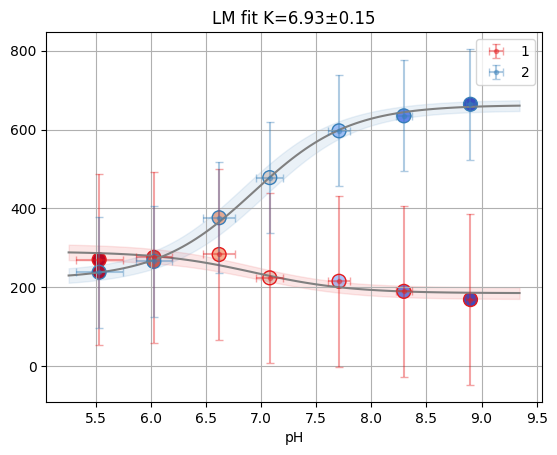
rp = tr_mcmc[well]
rp.figure
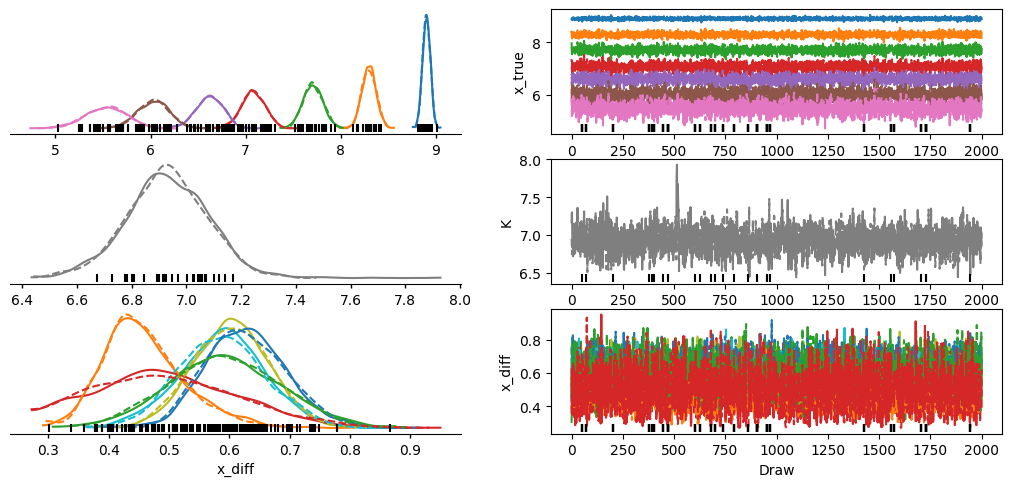
az.plot_trace_dist(rp.mini, var_names=["x_true", "K", "x_diff"])
<arviz_plots.plot_collection.PlotCollection at 0x7360d5fefa10>
# 5.1 Bayesian fitting with PyMC
result_mcmc = tr_mcmc[well]

print("MCMC Results:")
print(f"Kd: {result_mcmc.result.params['K'].value:.2f}")
print(
    f"95% HDI: [{result_mcmc.result.params['K'].min:.2f}, {result_mcmc.result.params['K'].max:.2f}]"
)
MCMC Results:
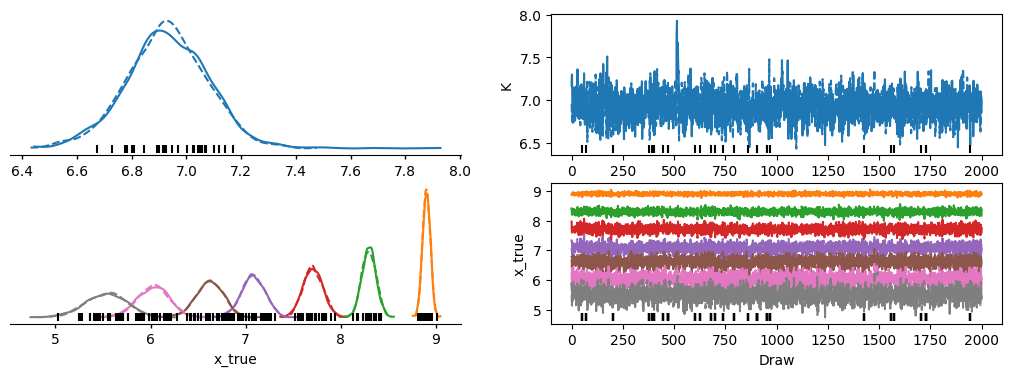
Kd: 6.93
95% HDI: [-inf, inf]
# Plot trace
az.plot_trace_dist(result_mcmc.mini, var_names=["K", "x_true"]);
2.6. Quality control and utilities#
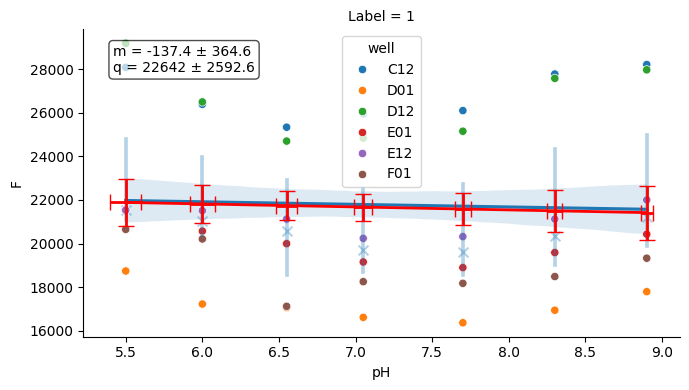
A few helper plots are useful to quickly assess experiment consistency (buffer, temperature).
# Buffer plot
buf_plot = tit.buffer.plot(nrm=False)
buf_plot.figure
# Temperature plot
temp_plot = tit.plot_temperature()
temp_plot
import pandas as pd
import seaborn as sns

df1 = pd.read_csv(l2_dir / "fit1-1.csv", index_col=0)
# merged_df = tit.result_dfs["1"][["K", "sK"]].merge(df1, left_index=True, right_index=True)
merged_df = tr_glob.dataframe[["K", "sK"]].merge(df1, left_index=True, right_index=True)

sns.jointplot(merged_df, x="K_y", y="K_x", ratio=3, space=0.4)
<seaborn.axisgrid.JointGrid at 0x7360d65701a0>
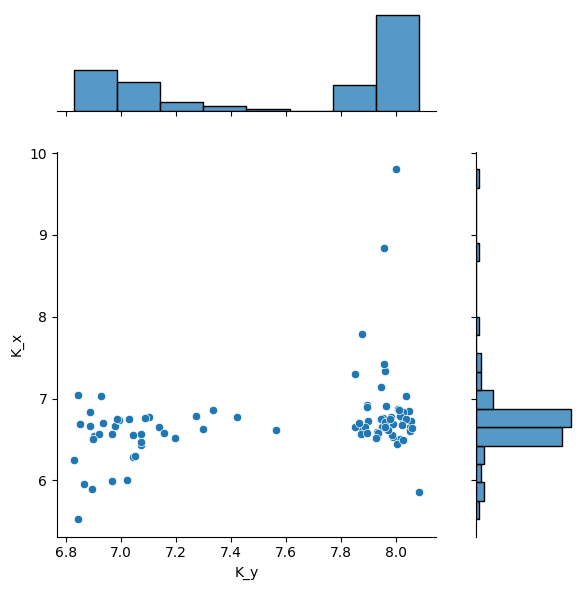
If a fit fails in a well, the well key will be anyway present in results list of dict.
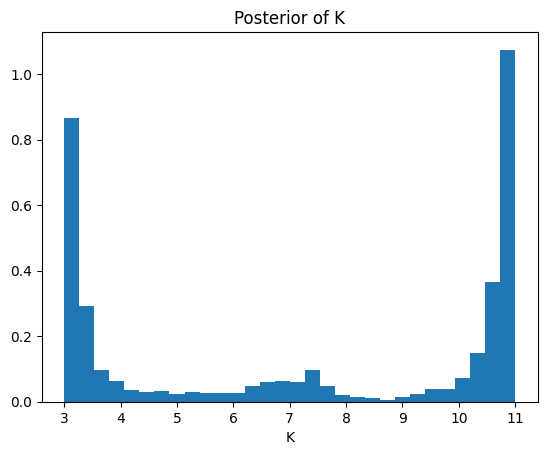
2.6.1. Posterior#
import os

from clophfit.fitting import plotting

np.random.seed(0)  # noqa: NPY002
remcee = glob.mini.emcee(
    burn=100,
    steps=2000,
    workers=int(os.environ.get("CLOPHFIT_EMCEE_WORKERS", "4")),
    thin=10,
    nwalkers=30,
    progress=False,
    is_weighted=True,
)

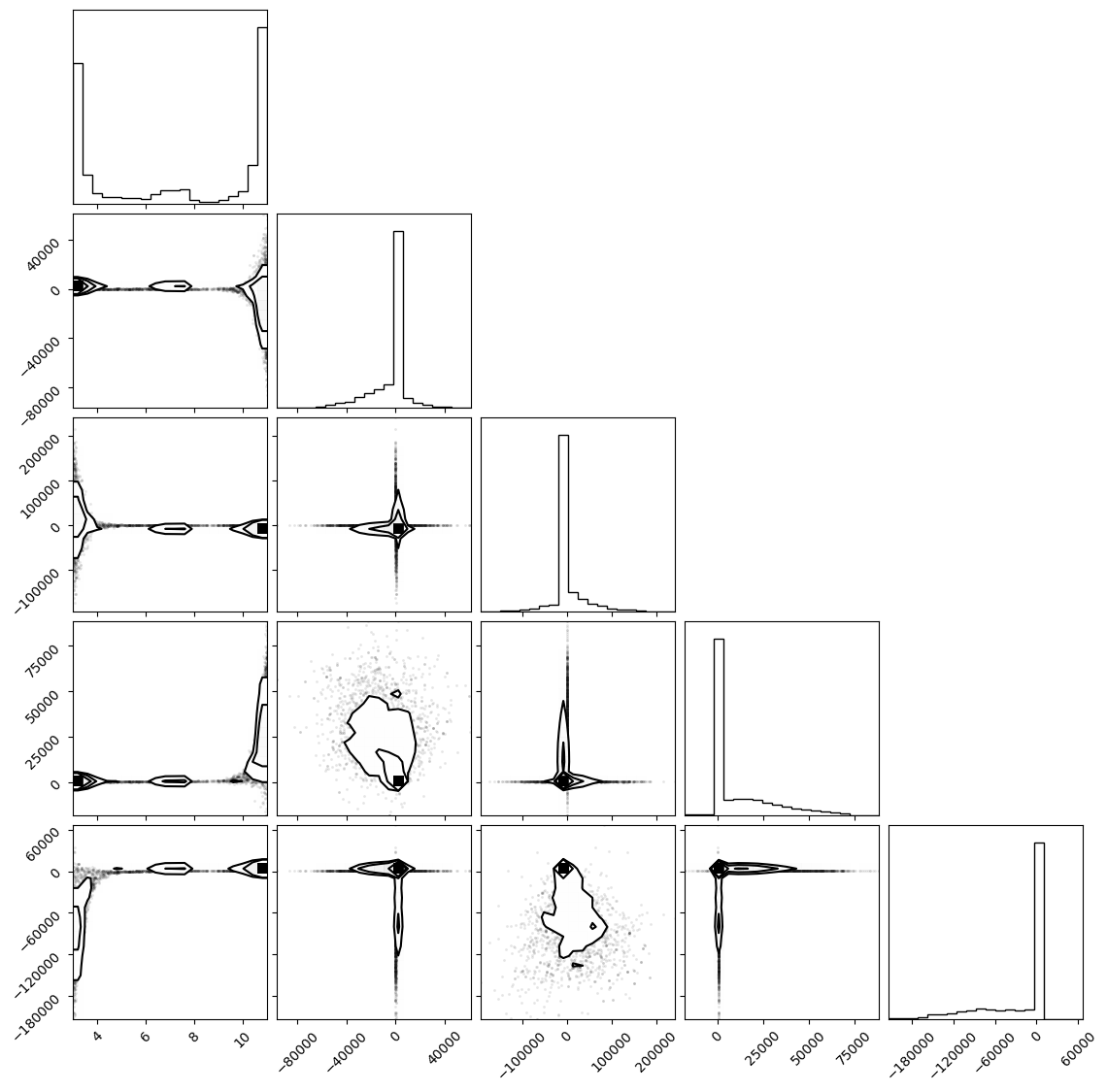
f = plotting.plot_emcee(remcee.flatchain)
print(remcee.flatchain.quantile([0.03, 0.97])["K"].to_list())
WARNING:root:Too few points to create valid contours
The chain is shorter than 50 times the integrated autocorrelation time for 5 parameter(s). Use this estimate with caution and run a longer chain!
N/50 = 40;
tau: [206.38062395 113.97071635  92.35685352 137.18588609 161.70371322]
WARNING:root:Too few points to create valid contours
WARNING:root:Too few points to create valid contours
WARNING:root:Too few points to create valid contours
WARNING:root:Too few points to create valid contours
[3.01865989622107, 10.984728618615785]
samples_dict = {
    col: remcee.flatchain[col].to_numpy()[np.newaxis, :]  # (1 chain, 5700 draws)
    for col in remcee.flatchain
}
idata = az.from_dict({"posterior": samples_dict})

# percentile on K
k_samples = idata.posterior["K"].to_numpy().flatten()
percentile_value = np.percentile(k_samples, 3)
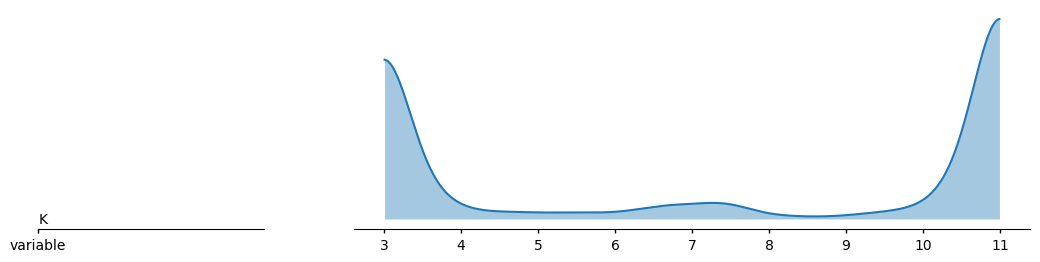
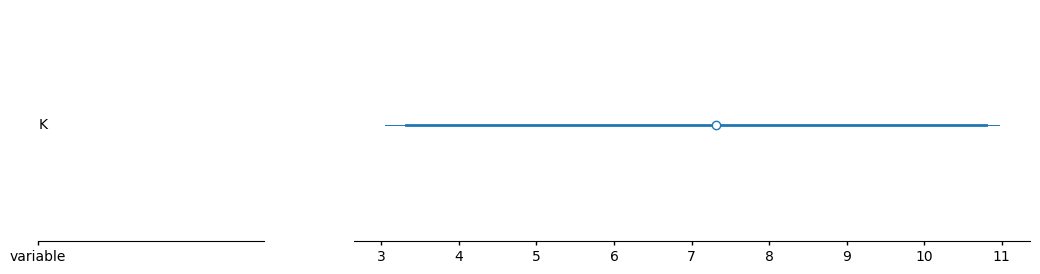
print(f"Value at which the probability of being higher is 99%: {percentile_value:.4f}")

az.plot_ridge(idata, var_names="K")
az.plot_forest(idata, var_names="K")
Value at which the probability of being higher is 99%: 3.0187
<arviz_plots.plot_collection.PlotCollection at 0x7360d68d1e00>
samples = remcee.flatchain[["K"]]
k_samples = samples["K"].to_numpy()
percentile_value = np.percentile(k_samples, 3)
print(f"Value at which the probability of being higher is 99%: {percentile_value}")

plt.hist(k_samples, bins=30, density=True)
plt.xlabel("K")
plt.title("Posterior of K")
Value at which the probability of being higher is 99%: 3.01865989622107
Text(0.5, 1.0, 'Posterior of K')
2.6.2. Combining#
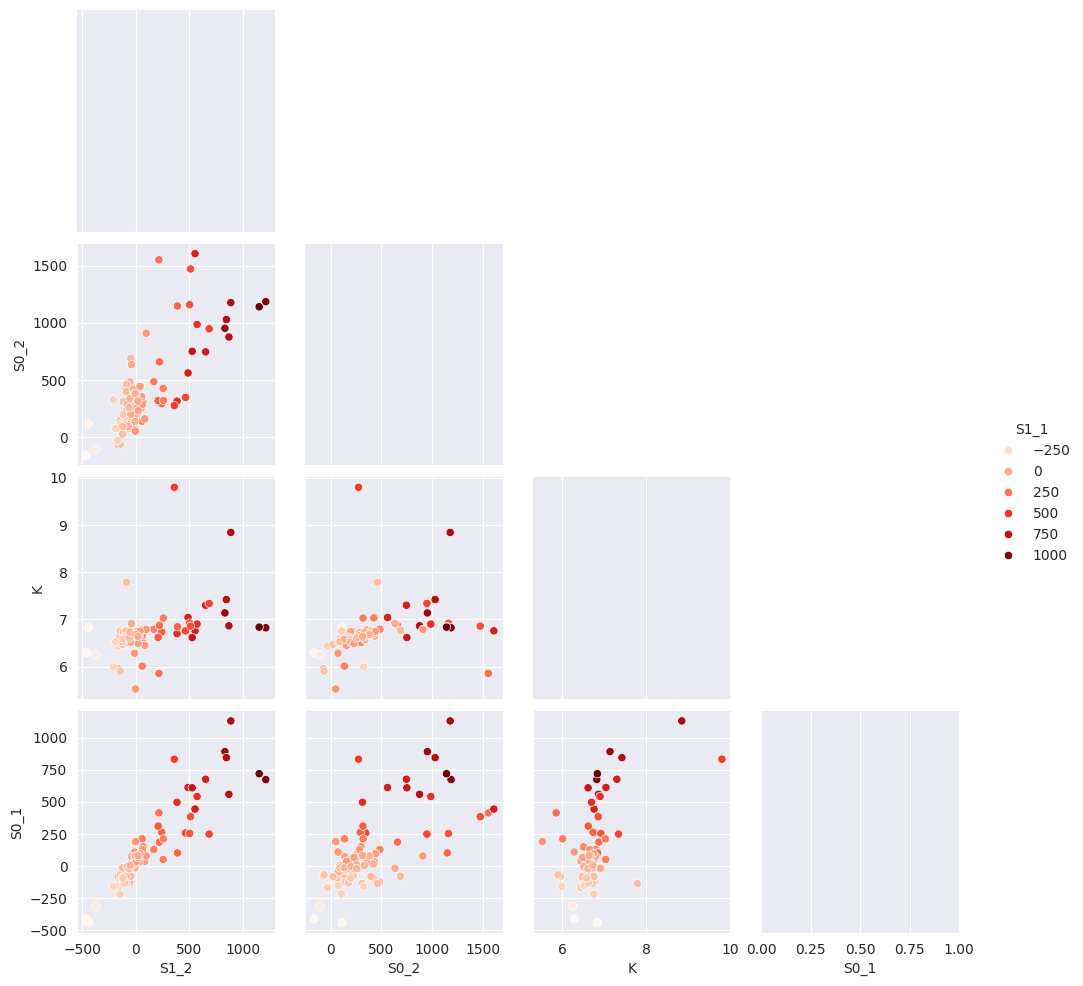
# Computed automatically earlier
with sns.axes_style("darkgrid"):
    g = sns.pairplot(
        tr_glob.dataframe[["S1_2", "S0_2", "K", "S1_1", "S0_1"]],
        hue="S1_1",
        palette="Reds",
        corner=True,
        diag_kind="kde",
    )
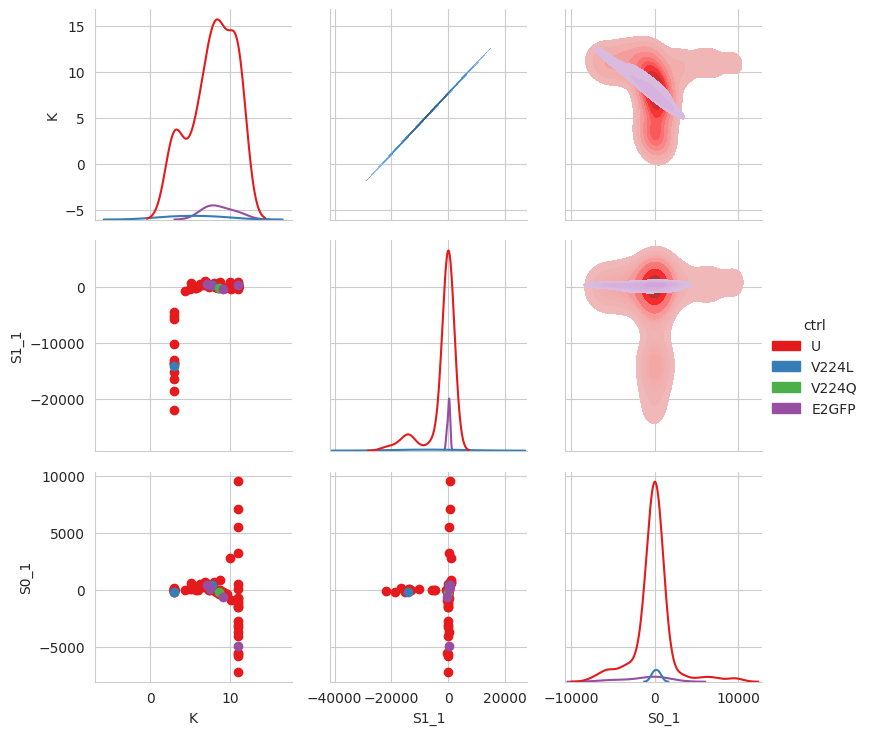
df_ctr = tr1.dataframe
for name, wells in tit.scheme.names.items():
    for well in wells:
        df_ctr.loc[well, "ctrl"] = name

df_ctr.loc[df_ctr["ctrl"].isna(), "ctrl"] = "U"

sns.set_style("whitegrid")
g = sns.PairGrid(
    df_ctr,
    x_vars=["K", "S1_1", "S0_1"],
    y_vars=["K", "S1_1", "S0_1"],
    hue="ctrl",
    palette="Set1",
    diag_sharey=False,
)
g.map_lower(plt.scatter)
g.map_upper(sns.kdeplot, fill=True)
g.map_diag(sns.kdeplot)
g.add_legend()
/home/docs/checkouts/readthedocs.org/user_builds/clophfit/envs/latest/lib/python3.13/site-packages/seaborn/axisgrid.py:1615: UserWarning: KDE cannot be estimated (0 variance or perfect covariance). Pass `warn_singular=False` to disable this warning.
  func(x=x, y=y, **kwargs)
/home/docs/checkouts/readthedocs.org/user_builds/clophfit/envs/latest/lib/python3.13/site-packages/seaborn/axisgrid.py:1615: UserWarning: KDE cannot be estimated (0 variance or perfect covariance). Pass `warn_singular=False` to disable this warning.
  func(x=x, y=y, **kwargs)
/home/docs/checkouts/readthedocs.org/user_builds/clophfit/envs/latest/lib/python3.13/site-packages/seaborn/axisgrid.py:1615: UserWarning: KDE cannot be estimated (0 variance or perfect covariance). Pass `warn_singular=False` to disable this warning.
  func(x=x, y=y, **kwargs)
/home/docs/checkouts/readthedocs.org/user_builds/clophfit/envs/latest/lib/python3.13/site-packages/seaborn/axisgrid.py:1513: UserWarning: Dataset has 0 variance; skipping density estimate. Pass `warn_singular=False` to disable this warning.
  func(x=vector, **plot_kwargs)
/home/docs/checkouts/readthedocs.org/user_builds/clophfit/envs/latest/lib/python3.13/site-packages/seaborn/axisgrid.py:1513: UserWarning: Dataset has 0 variance; skipping density estimate. Pass `warn_singular=False` to disable this warning.
  func(x=vector, **plot_kwargs)
/home/docs/checkouts/readthedocs.org/user_builds/clophfit/envs/latest/lib/python3.13/site-packages/seaborn/axisgrid.py:1513: UserWarning: Dataset has 0 variance; skipping density estimate. Pass `warn_singular=False` to disable this warning.
  func(x=vector, **plot_kwargs)
<seaborn.axisgrid.PairGrid at 0x7360cedd8910>
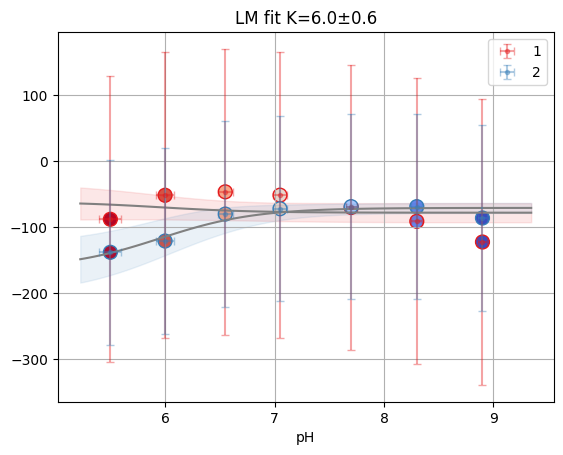
tr_glob["A04"].figure
keys_unk = tit.fit_keys - set(tit.scheme.ctrl)
res_unk = tr_glob.dataframe.loc[list(keys_unk)].sort_index()
res_unk["well"] = res_unk.index

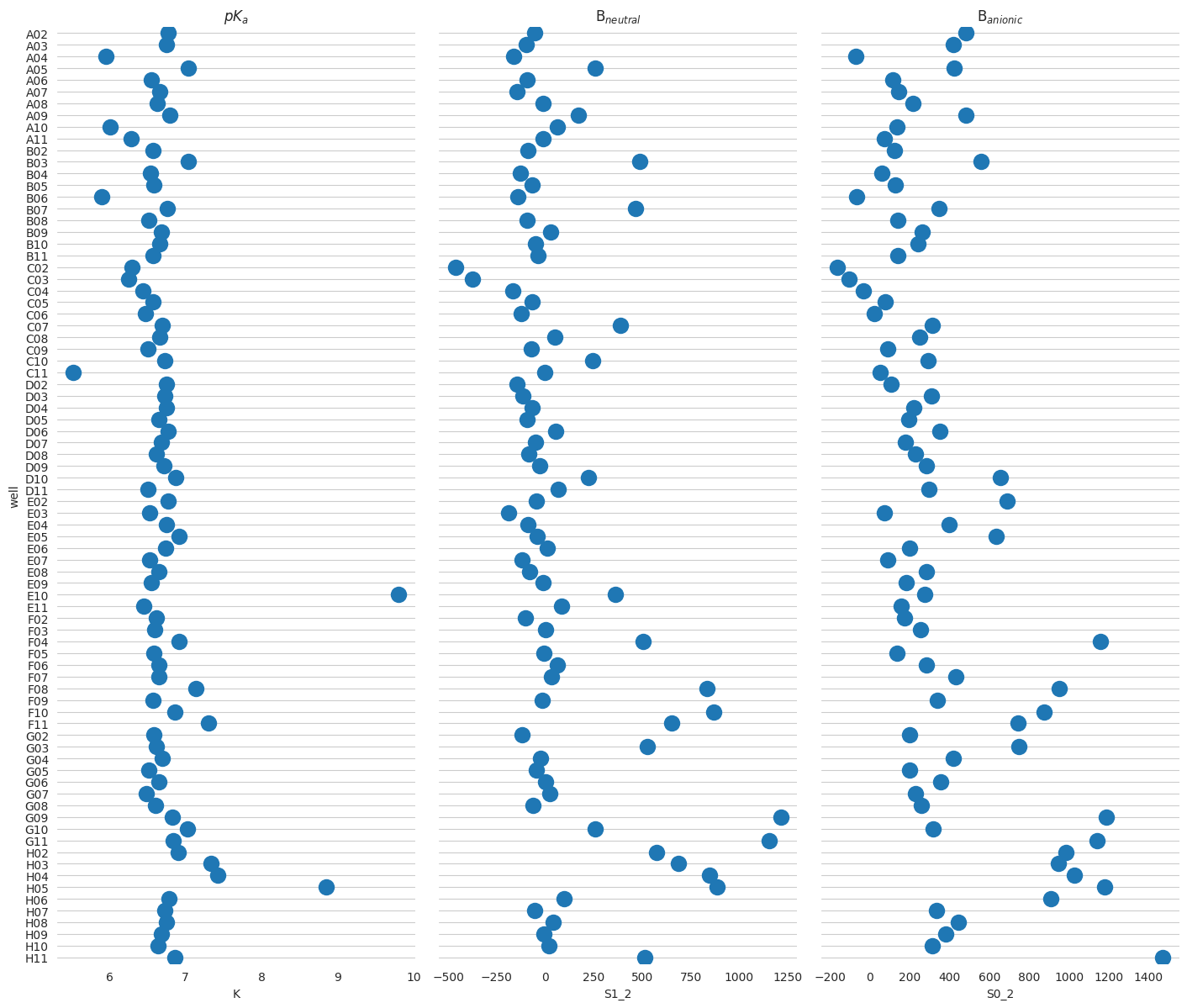
f = plt.figure(figsize=(24, 14))
# Make the PairGrida
g = sns.PairGrid(
    res_unk,
    x_vars=["K", "S1_2", "S0_2"],
    y_vars="well",
    height=12,
    aspect=0.4,
)
# Draw a dot plot using the stripplot function
g.map(sns.stripplot, size=14, orient="h", palette="Set2", edgecolor="auto")

# Use the same x axis limits on all columns and add better labels
# g.set(xlim=(0, 25), xlabel="Crashes", ylabel="")

# Use semantically meaningful titles for the columns
titles = ["$pK_a$", "B$_{neutral}$", "B$_{anionic}$"]

for ax, title in zip(g.axes.flat, titles, strict=False):
    # Set a different title for each axes
    ax.set(title=title)

    # Make the grid horizontal instead of vertical
    ax.xaxis.grid(visible=False)
    ax.yaxis.grid(visible=True)

sns.despine(left=True, bottom=True)
<Figure size 2400x1400 with 0 Axes>
2.7. Background method comparison#
Different background methods may slightly shift baselines; inspect the impact on a single well.
methods = ["mean", "meansd", "fit"]
well = "D10"
fig, axes = plt.subplots(1, len(methods), figsize=(16, 4), sharey=True)
for ax, method in zip(axes, methods, strict=False):
    tit.params.bg_mth = method
    ax.plot(tit.x, tit.data["1"][well], "o-", label=method)
    ax.axhline(0, color="gray", ls="--", lw=1)
    ax.set_title(f"method: {method}")
    ax.set_xlabel("pH")
axes[0].set_ylabel("Signal")
plt.tight_layout()
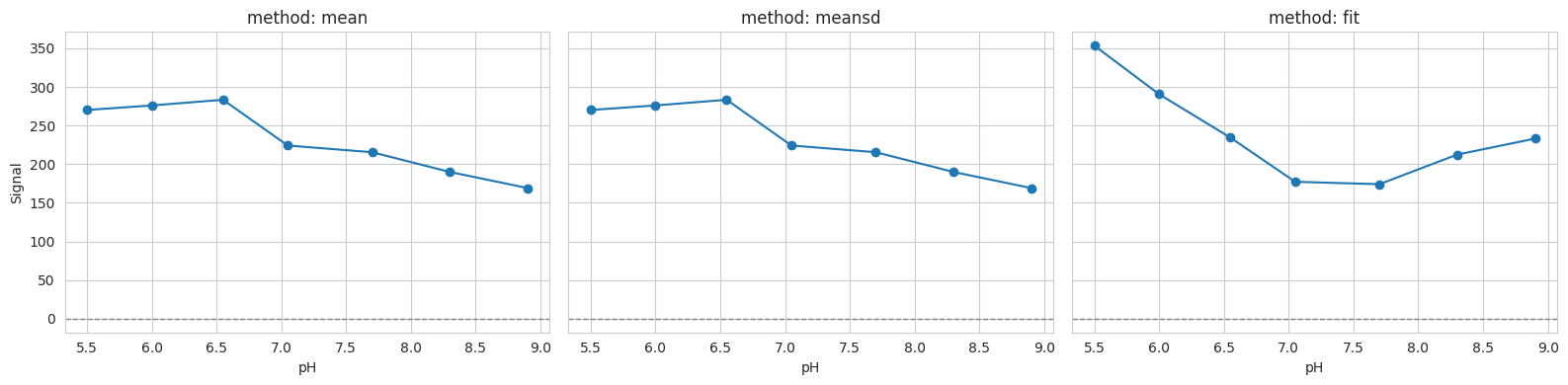
You can decide how to pre-process data with datafit_params:
[bg] subtract background
[dil] apply correction for dilution (when e.g. during a titration you add titrant without protein)
[nrm] normalize for gain, number of flashes and integration time.
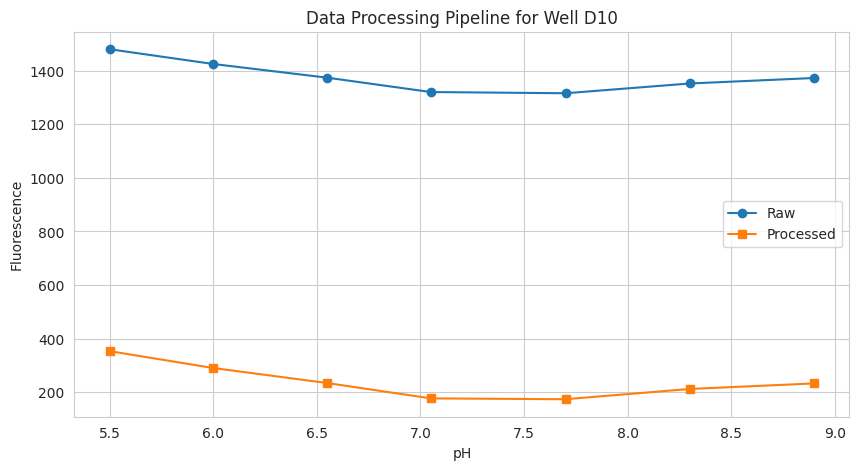
# 3.1 Accessing processed data
well = "D10"
data = {
    "pH": tit.x,
    "Signal (raw)": tit.labelblocksgroups["1"].data_nrm[well],
    "Signal (processed)": tit.data["1"][well],
}

plt.figure(figsize=(10, 5))
plt.plot(data["pH"], data["Signal (raw)"], "o-", label="Raw")
plt.plot(data["pH"], data["Signal (processed)"], "s-", label="Processed")
plt.xlabel("pH")
plt.ylabel("Fluorescence")
plt.title(f"Data Processing Pipeline for Well {well}")
plt.legend()
plt.grid(visible=True)
2.8. Cl titration analysis#
cl_an = prtecan.Titration.fromlistfile(l2_dir / "list.cl.csv", is_ph=False)
cl_an.load_scheme(l2_dir / "scheme.txt")
cl_an.scheme
WARNING:clophfit.prtecan.models: OVER value in Label1: H02 of tecanfile ../../tests/Tecan/140220/pH5.0_200214.xls
PlateScheme(file=PosixPath('../../tests/Tecan/140220/scheme.txt'), _buffer=['D01', 'E01', 'D12', 'E12'], _discard=[], _ctrl=['A01', 'H12', 'B01', 'G01', 'A12', 'C12', 'C01', 'B12', 'G12', 'F12', 'H01', 'F01'], _names={'G03': {'A01', 'H12', 'B12'}, 'NTT': {'C12', 'F12', 'F01'}, 'S202N': {'C01', 'H01', 'G12'}, 'V224Q': {'G01', 'A12', 'B01'}})
from clophfit import prtecan

cl_an.load_additions(l2_dir / "additions.cl")
print(cl_an.x)
cl_an.x = prtecan.calculate_conc(cl_an.additions, 1000)
cl_an.x
[0. 0. 0. 0. 0. 0. 0. 0. 0.]
array([  0.        ,  17.54385965,  34.48275862,  50.84745763,
        66.66666667,  81.96721311,  96.77419355, 138.46153846,
       164.17910448])
ds_glob_cl = cl_an.create_dataset_dict()
tr_glob_cl = prtecan.TitrationResults(
    cl_an.scheme, cl_an.fit_keys, fit_plate(ds_glob_cl, method="lm")
)
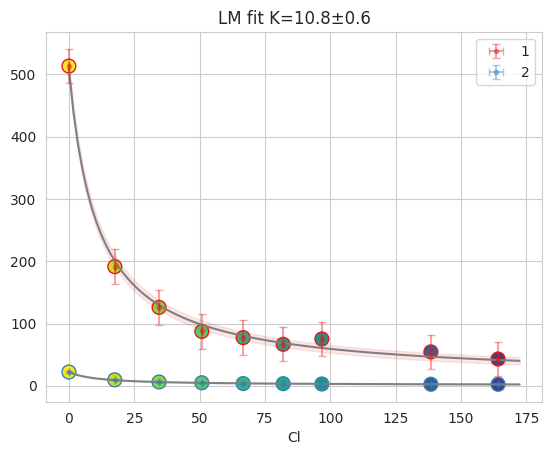
fres = tr_glob_cl["D10"]
print(fres.is_valid(), fres.result.bic, fres.result.redchi)
fres.figure
lm
True -34.533521922742366 0.0910826776686997
2.9. Batch export (optional)#
You can export processed data and fit results using TecanConfig.
Note: adjust paths and toggles (png, fit, comb) as needed.
tit.params
TitrationConfig(bg=True, bg_adj=False, dil=True, nrm=True, bg_mth='fit', fit_method='huber', outlier=None, mcmc='None', nuts_sampler='default', n_mcmc_samples=2000, ctr_free_k=False, noise_alpha=(), noise_gain=(), mask_outliers=False, outlier_threshold=0.2, discard_bad_wells=False)
tit.params.bg_mth = "meansd"
tit.params.mcmc = None
# Fits are computed via fit_plate now
from tempfile import mkdtemp

from clophfit.prtecan.export import export_data_fit

out_dir = Path(mkdtemp())
conf = prtecan.TecanConfig(
    out_fp=out_dir, comb=False, lim=None, title="FullAnalysis", fit=True, png=True
)
export_data_fit(tit, conf)
print("Exported to:", out_dir)
# list(out_dir.glob('*'))[:10]
# print("Contents:", *[f.name for f in output_dir.glob("*")], sep="\n- ")
huber
huber
huber
Exported to: /tmp/tmpmu54smgw